Descript AI Review for Real Estate Agents: Edit Videos Like a Doc
Key Takeaways
A comprehensive Descript review for real estate agents covering pricing, AI features, transcript-based video editing, filler word removal, Studio Sound, and how to create polished listing videos without any editing experience.
16 min read by ListingFlare Team
Video is the single most powerful content format in real estate marketing right now. According to the National Association of Realtors, 73% of homeowners say they are more likely to list with an agent who uses video. Listings with video get 403% more inquiries than those without, and AI editing tools like Descript are making it easier than ever to create them. Buyers overwhelmingly prefer video tours over static photos when browsing homes online.
And yet, the vast majority of real estate agents do not create video content consistently. Why? Because traditional video editing is genuinely painful. Learning Premiere Pro or Final Cut Pro takes months. Even "beginner-friendly" editors like iMovie require you to scrub through timelines, split clips, adjust audio, add transitions, and export in the right format. A 2-minute listing walkthrough can easily take 45 minutes to an hour to edit, and that is if you already know what you are doing.
That is the problem Descript solves. Instead of editing video on a traditional timeline, you edit the transcript. Delete a sentence from the text, and Descript removes that exact segment from the video. It is as simple as editing a Google Doc. No timeline. No scrubbing. No technical skills required.
We spent several weeks testing Descript specifically for real estate workflows - listing walkthroughs, market updates, social media clips, and property tours. Here is our full Descript review for real estate agents in 2026, covering everything from pricing to step-by-step workflows to whether it actually lives up to the hype.
What Is Descript?
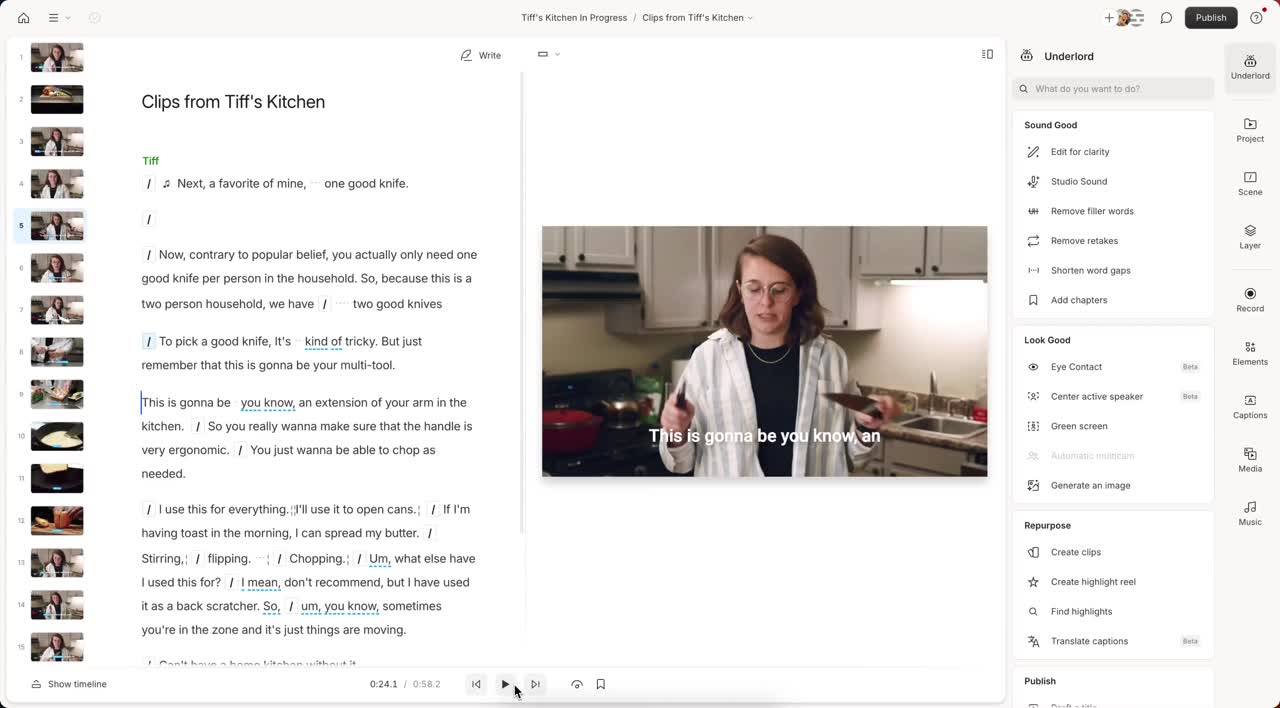
Descript is an AI-powered video and audio editing platform that takes an entirely different approach to editing. Instead of working with a traditional drag-and-drop timeline, the platform automatically transcribes your video and lets you edit the footage by editing the transcript text. If you can use a word processor, you can edit video in Descript. It really is that simple.
The company was founded in 2017 by Andrew Mason (yes, the Groupon founder) and has grown into one of the most popular video editing tools for creators, marketers, podcasters, and businesses. As of 2026, Descript has raised over $100 million in funding and serves millions of users worldwide.
The core features that make Descript stand out for real estate agents:
- Transcript-Based Editing - Record or upload a video, and Descript automatically transcribes it with high accuracy. Edit the text, and the video edits itself. Delete a sentence, and that segment is removed from the video. Rearrange paragraphs, and the video clips rearrange to match.
- Filler Word Removal - The software automatically detects and highlights every "um," "uh," "like," "you know," and other filler words in your transcript. One click removes them all from both the text and the video. This alone saves agents hours of manual editing.
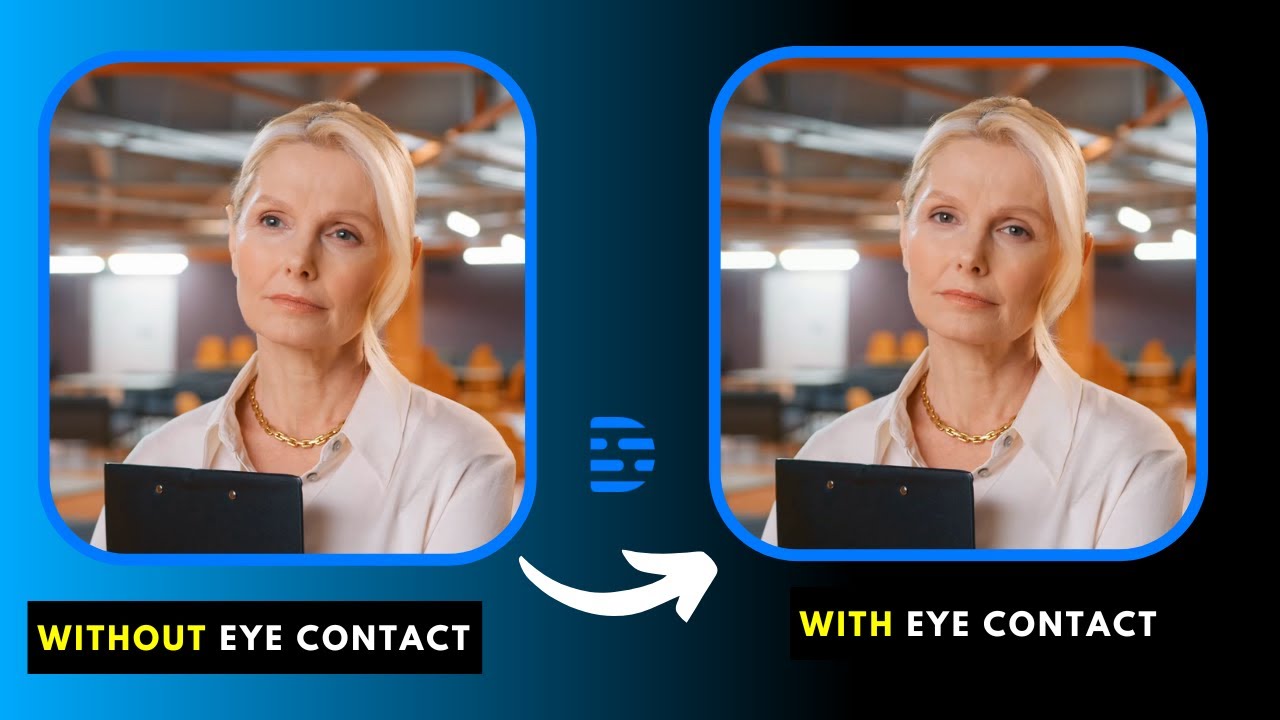
- AI Eye Contact Correction - Even if you were looking at notes, a teleprompter, or the floor during recording, Descript's AI adjusts your eye line so it looks like you are making direct eye contact with the camera. The result is surprisingly convincing.
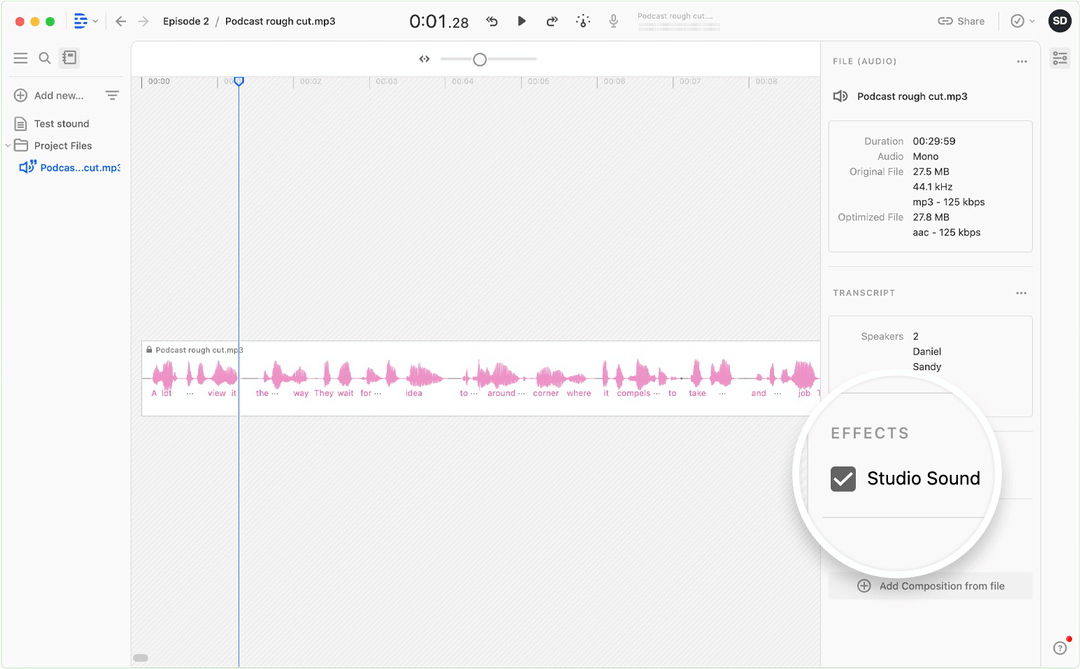
- Studio Sound - An AI-powered noise removal tool that cleans up background noise from your recordings. Barking dogs, traffic noise, HVAC hum, wind, and echo are all dramatically reduced. Your audio sounds like it was recorded in a professional studio.
- Overdub (AI Voice Clone) - Clone your own voice and use it to generate new audio from text. Made a mistake during recording? Instead of re-shooting, just type the correction and Descript generates the audio in your voice. The corrected audio blends seamlessly into the original recording.
- Screen Recording - Built-in screen and webcam recording, perfect for market update presentations, CMA walkthroughs, and neighborhood guides where you want to share your screen while talking.
- Auto-Captions - Generate accurate, stylized captions for social media videos. Since 85% of social media videos are watched without sound, captions are essential for engagement.
- Templates and Scenes - Pre-built layouts and templates for different video styles, including social media formats, presentations, and multi-camera setups.
- Text-to-Speech - Convert written text into natural-sounding speech using AI voices. Useful for creating quick explainer videos or adding narration without recording yourself.
The magic of this tool is that all of these features work together in a single interface. You do not need to bounce between five different apps. Record, transcribe, edit, add captions, clean audio, correct eye contact, and export - all in one place.
Descript Pricing Breakdown for Real Estate Agents
The platform uses a subscription model based on transcription hours and feature access. Here is the complete pricing breakdown as of early 2026:
| Plan | Monthly | Annual | Media Hours |
|---|---|---|---|
| Free | $0 | $0 | Limited |
| Hobbyist | $24/mo | $16/mo | 10 hrs/mo |
| Creator (Most Popular) | $35/mo | $24/mo | 30 hrs/mo |
| Business | $65/mo | $50/mo | 40 hrs/mo |
| Enterprise | Custom | Custom | Custom |
All paid plans include: Filler word removal, Studio Sound, and AI eye contact correction. Hobbyist includes 400 AI credits/mo and 1080p export. Creator adds 800+ AI credits/mo, 4K export, and royalty-free stock library. Business adds Brand Studio, 1,500+ AI credits/mo, 30+ language dubbing, and custom avatars.
To put this in perspective for a typical real estate agent. If you record one 5-minute listing walkthrough video per week, that is roughly 20 minutes of raw footage per month (accounting for mistakes and re-takes). Add a couple of market update videos and some quick social media clips, and you are looking at maybe 2 to 3 hours of total transcription time per month. The Hobbyist plan at $24/month covers that easily with room to spare.
For comparison, hiring a freelance video editor costs $50 to $200 per video. At just two videos per month, you are paying $100 to $400 versus $24 for Descript. The math is not even close. If you are creating any video content at all, Descript pays for itself immediately.
Our recommendation for most real estate agents: start with the Hobbyist plan at $24/month. It includes all the AI features you need - filler word removal, Studio Sound, eye contact correction, and watermark-free exports. If you find yourself hitting the 10-hour transcription limit or need Overdub voice cloning, upgrade to Business. Skip the Free plan for actual production work since the watermark and limited exports make it impractical for professional content.
Try Descript Free →
How Real Estate Agents Use Descript
The features list sounds impressive on paper, but how does Descript actually fit into a real estate agent's day-to-day workflow? We tested every major use case. Here is how each feature translates into real value for your business.
Edit Listing Walkthrough Videos by Editing Text
This is the flagship use case and the reason Descript exists. You record a listing walkthrough on your phone, upload it to Descript, and the platform generates a full transcript within seconds. Now, instead of scrubbing through a timeline trying to find the part where you stumbled over the kitchen description, you just read the transcript, find the mistake, and delete it.
Say you recorded a 4-minute walkthrough and tripped over your words when describing the primary bathroom. In a traditional editor, you would need to find that exact timestamp, split the clip, delete the segment, and close the gap. In Descript, you highlight the fumbled sentence in the transcript and press delete. Done. The video seamlessly cuts around it.
You can also rearrange sections. If you walked through the backyard before the kitchen but want to reorder them in the final video, just cut and paste the paragraphs in the transcript. The video clips follow. It feels like editing a document, and for agents who have never touched video editing software, this is a revelation.
AI Eye Contact Correction
This feature alone might justify the subscription for some agents. When recording listing walkthroughs, you are naturally looking around the room, glancing at your notes, checking the camera angle, or reading bullet points about the home's features. The result is footage where you rarely look directly at the camera, which makes the video feel less engaging and less trustworthy to viewers.
Descript's eye contact correction uses AI to subtly adjust your eye line so it appears you are looking directly into the camera lens. The effect is not perfect in every frame, but in our testing it was convincing about 90% of the time. For talking-head segments where you are standing in a room and speaking to the camera, it works remarkably well. The difference in perceived confidence and authority is significant.
One tip: eye contact correction works best when your face is clearly visible and relatively still. Quick head movements or extreme angles can break the illusion. For best results, position yourself facing the camera and keep your head movements natural. The AI handles the rest.
Automatic Filler Word Removal
Every agent has verbal tics. "Um," "uh," "like," "so," "you know," "basically" - these filler words creep into every recording. In casual conversation they are invisible, but in a listing video they make you sound unprepared and unprofessional. The problem is that manually finding and removing every filler word from a 3-minute video can take 20 to 30 minutes in a traditional editor.
Descript solves this in about three seconds. After transcription, it highlights every detected filler word in the transcript. Click "Remove filler words" and they all disappear from both the text and the video. The cuts are clean and natural. In our testing, we recorded a deliberately filler-heavy 2-minute walkthrough (23 filler words total) and Descript caught and removed every single one. The resulting video sounded polished and professional with zero manual effort.
Studio Sound for Noisy Recordings
Real estate recordings happen in less-than-ideal audio environments. You are filming at an open house with people chatting in the background. You are standing on a busy street explaining the neighborhood. You are in an empty house with hard floors and echo bouncing everywhere. You are outside and the wind is whipping past the microphone.
Descript's Studio Sound feature uses AI to isolate your voice and dramatically reduce background noise. It does not make bad audio perfect, but it makes bad audio usable. In our testing, we recorded a listing walkthrough with audible traffic noise from an open window. Studio Sound reduced the traffic to a barely noticeable hum while keeping the voice clear and natural. We also tested it in an empty room with significant echo, and the improvement was immediately noticeable.
The key limitation is that Studio Sound works best when your voice is the primary audio source. If you are speaking quietly while loud music plays in the background, it will struggle. But for the typical real estate recording scenario - your voice in a somewhat noisy environment - it performs well enough to save you from re-recording.
Screen Recording for Market Update Presentations
Market update videos are one of the highest-engagement content types for real estate agents on social media. When you share local stats, trends, and insights, you position yourself as the neighborhood expert. But creating a polished market update video usually means recording a screen share, editing it, adding captions, and exporting - a multi-tool process.
Descript has built-in screen recording with webcam overlay. You can record your screen (showing charts, MLS data, neighborhood maps, or slides) while your webcam captures you talking in a corner bubble. When you stop recording, the video is automatically transcribed and ready to edit. Delete the part where you pulled up the wrong tab. Remove filler words. Add captions. Export. All without leaving Descript.
This streamlined workflow turns market update videos from a 2-hour production into a 20-minute task. Record for 5 minutes, spend 10 minutes cleaning up the transcript, add captions, and export. That is it.
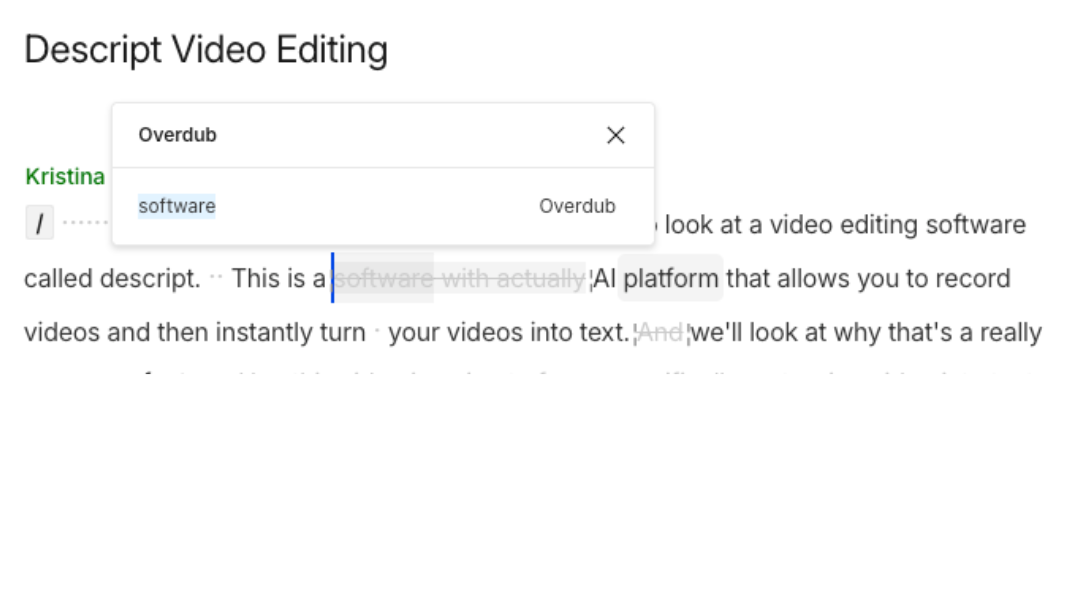
Overdub - AI Voice Clone for Quick Corrections
Overdub is Descript's AI voice cloning feature, available on the Business plan. You train the AI on your voice by reading a script for about 10 minutes, and it creates a digital clone that can generate new audio from any text you type.
The practical use case for agents is fixing mistakes without re-recording. Imagine you finished editing a listing video and then realized you said the home has "three bathrooms" when it actually has "three and a half bathrooms." In any other editor, you would need to re-record that segment, match the audio levels, and splice it in. With Overdub, you highlight the wrong text in the transcript, type the correction, and Descript generates the new audio in your voice and drops it into the video. It takes about 15 seconds.
The voice quality is good but not flawless. In our testing, the cloned voice was about 85% accurate to the original. Most viewers would not notice the difference, especially in a fast-paced social media video. For high-stakes content like a luxury listing film, you might prefer to re-record. But for everyday social media content, Overdub is a massive time saver.
Auto-Captions for Social Media Accessibility
Captions are no longer optional for social media video. Studies show that videos with captions receive 40% more views and significantly higher completion rates. The reason is simple - most people scroll social media in public, at work, or in bed next to a sleeping partner. They are watching without sound. If your video does not have captions, they scroll right past it.
Descript generates accurate captions automatically from your transcript. You can customize the font, size, color, position, and style. The word-by-word highlight animation (where each word lights up as it is spoken) is especially effective for short-form content on Instagram Reels and TikTok.
You can also manually edit the captions if the transcription made an error on a street name, neighborhood, or real estate term. This level of control is better than what most dedicated captioning tools offer, and it is built right into the editing workflow.
Clip Creation for Reels and TikTok
One of the smartest content strategies for real estate agents is recording one longer video (3 to 5 minutes) and then cutting it into multiple short clips for Reels, TikTok, and YouTube Shorts. A single listing walkthrough can yield 3 to 5 short clips, each highlighting a different feature of the home.
Descript makes this easy with its clip creation features. After editing your full video, you can select sections of the transcript, right-click, and create a new composition from that selection. Resize the canvas to 9:16 for vertical video, add captions, and export. You go from one 4-minute walkthrough to four 30-second Reels in minutes.
Descript also has an AI feature that can automatically identify the most engaging segments of your video and suggest them as potential clips. While the AI suggestions are not always perfect for real estate content (it tends to favor dramatic moments over informational ones), it is a useful starting point.

Step-by-Step: Creating a Listing Video with Descript
The exact workflow we recommend for real estate agents creating listing walkthrough videos with Descript. Follow these steps and you will go from raw footage to a polished, captioned video in under 15 minutes.
Step 1: Record Your Walkthrough
Use your smartphone to record a walkthrough of the listing. You do not need a gimbal, professional camera, or external microphone - although a $20 clip-on lavalier mic will noticeably improve audio quality. Walk through the home naturally, describing each room and pointing out features. Do not worry about mistakes, filler words, or stumbles. You are going to fix all of that in editing.
Aim for 3 to 5 minutes of raw footage. Speak at a natural pace. If you mess up a sentence, just pause for a second and start that sentence over. The pause makes it easy to identify and delete the mistake later.
Step 2: Upload and Transcribe
Open Descript and create a new project. Drag your video file into the project. Descript will automatically transcribe the audio, which usually takes 30 to 60 seconds for a 5-minute video. Review the transcript for accuracy - it is typically 95%+ correct, but proper nouns (street names, neighborhood names, specific model names) sometimes need manual correction.
Step 3: Clean Up the Transcript
This is where Descript earns its money. Start by clicking the "Remove filler words" button to automatically strip out every um, uh, and like. Then read through the transcript and delete any sentences where you stumbled, repeated yourself, or said something you want to cut. Each deletion automatically removes that segment from the video.
If you want to rearrange sections (maybe you want to start with the kitchen instead of the foyer), simply cut and paste the paragraphs in the transcript. The video follows. Spend about 5 to 7 minutes on this step.
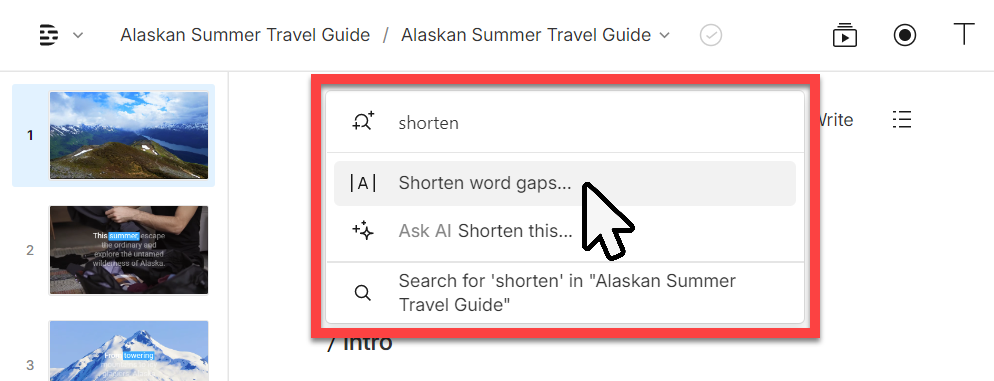
Step 4: Apply AI Enhancements
Turn on Studio Sound to clean up background noise. Enable eye contact correction if you have any talking-head segments. Check the "Shorten word gaps" option to tighten up the pacing by reducing long pauses between sentences. These three toggles alone make a dramatic difference in the final quality.
Step 5: Add Captions and Branding
Enable auto-captions and choose a style that matches your branding. Add your logo as a watermark if desired. If you are creating a vertical version for social media, resize the canvas to 9:16 and reposition the captions.
Step 6: Export
Export the final video. For social media, 1080p is sufficient. For YouTube or your website, go with 4K if your original footage supports it (Business plan required). Descript exports are fast - a 3-minute video typically renders in under 2 minutes.
Total time from upload to export: approximately 10 to 15 minutes. Compare that to 45 minutes to an hour in a traditional video editor, and you can see why Descript has become so popular with content creators who are not professional editors.
Descript Pros and Cons for Real Estate Agents
After extensive testing, here is our honest assessment of where Descript excels and where it falls short for real estate-specific use cases.
Pros
- Incredibly easy to learn - edit video like editing a Google Doc
- Filler word removal - removes every um and uh in seconds
- Studio Sound - cleans up open house noise, echo, and wind
- Eye contact correction - AI fixes your eye line for camera confidence
- All-in-one platform - record, transcribe, edit, caption, and export in one app
- Fast export times - quick rendering for same-day publishing
- Regular updates - new AI features shipped frequently
Cons
- Limited advanced editing - no complex transitions, motion graphics, or color grading
- Transcription accuracy varies with accents - can drop below 90% accuracy
- Eye contact correction not always seamless - struggles with quick head movements
- Voice clone requires Business plan - $50/mo annually, $65/mo monthly
- No mobile editing app - desktop only on Mac and Windows
- Large video files slow to upload - 4K footage takes time to transfer
- Subscription adds up - hard to justify if you rarely create videos
Descript vs Alternatives: How Does It Compare?
Descript is not the only video editing option for real estate agents. Here is how it compares to the most popular alternatives so you can make an informed decision.
Descript vs CapCut
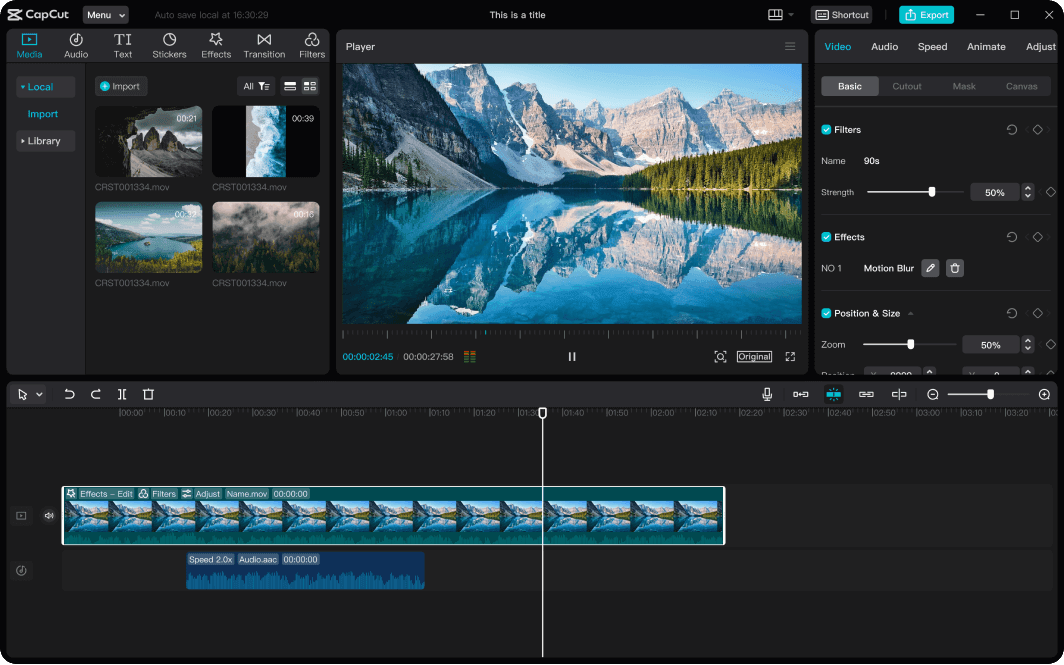
CapCut is a free video editor from ByteDance (the company behind TikTok). It has exploded in popularity because it is free, available on mobile and desktop, and packed with trendy effects, transitions, and templates.
For short social media clips, CapCut is excellent. It has a massive library of effects, music, and templates designed specifically for Reels and TikTok. If you are exclusively creating 15 to 60 second vertical videos for social media, CapCut is a strong free option.
However, CapCut uses a traditional timeline editor, which means you are still scrubbing, splitting, and arranging clips manually. It does not have transcript-based editing, so you cannot fix mistakes by editing text. It also lacks Studio Sound, AI eye contact correction, and Overdub. For longer listing videos (2+ minutes), the editing process in CapCut takes significantly longer than in Descript.
Verdict: Use CapCut for quick social media clips when you need trendy effects. Use Descript for anything where you are speaking to the camera and need to edit efficiently.
Descript vs Adobe Premiere Pro
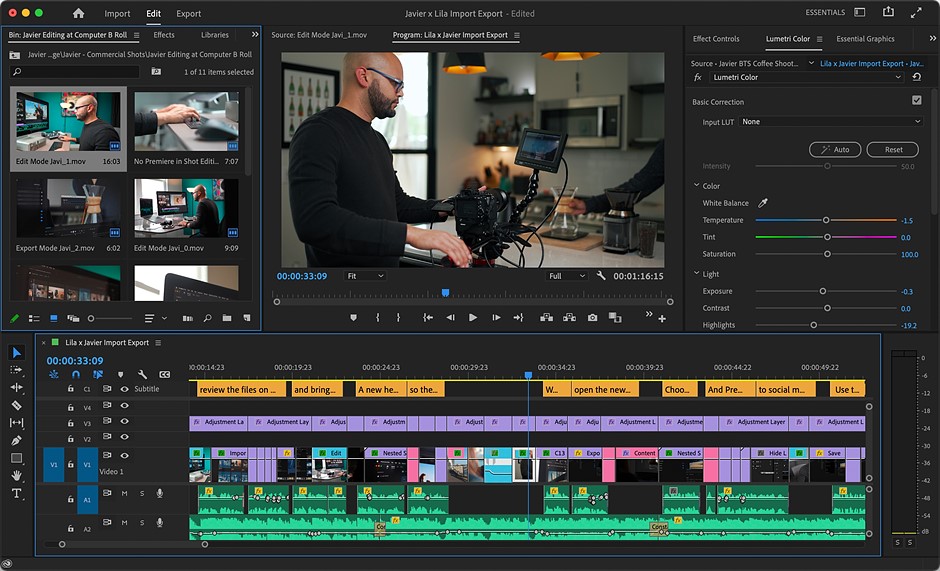
Adobe Premiere Pro is the industry-standard professional video editor. It can do virtually anything - complex transitions, multi-camera editing, advanced color grading, motion graphics, and more. It is what professional videographers use to create cinematic listing films and brand videos.
The tradeoff is complexity. Premiere Pro has a steep learning curve that takes months to become proficient with. The interface is dense with panels, toolbars, and nested menus. For a working real estate agent who just needs to clean up a listing walkthrough, Premiere Pro is massive overkill. It also costs $22.99/month for a single app subscription (or $59.99/month for the full Creative Cloud suite).
Adobe has recently added some AI features including AI-powered transcription and text-based editing that are inspired by Descript. However, these features are still secondary to the traditional timeline workflow and not nearly as polished as Descript's implementation.
Verdict: Premiere Pro is for professional videographers, not for agents editing their own content. If you hire a videographer, they will likely use Premiere Pro. For DIY editing, Descript is vastly more practical.
Descript vs Final Cut Pro
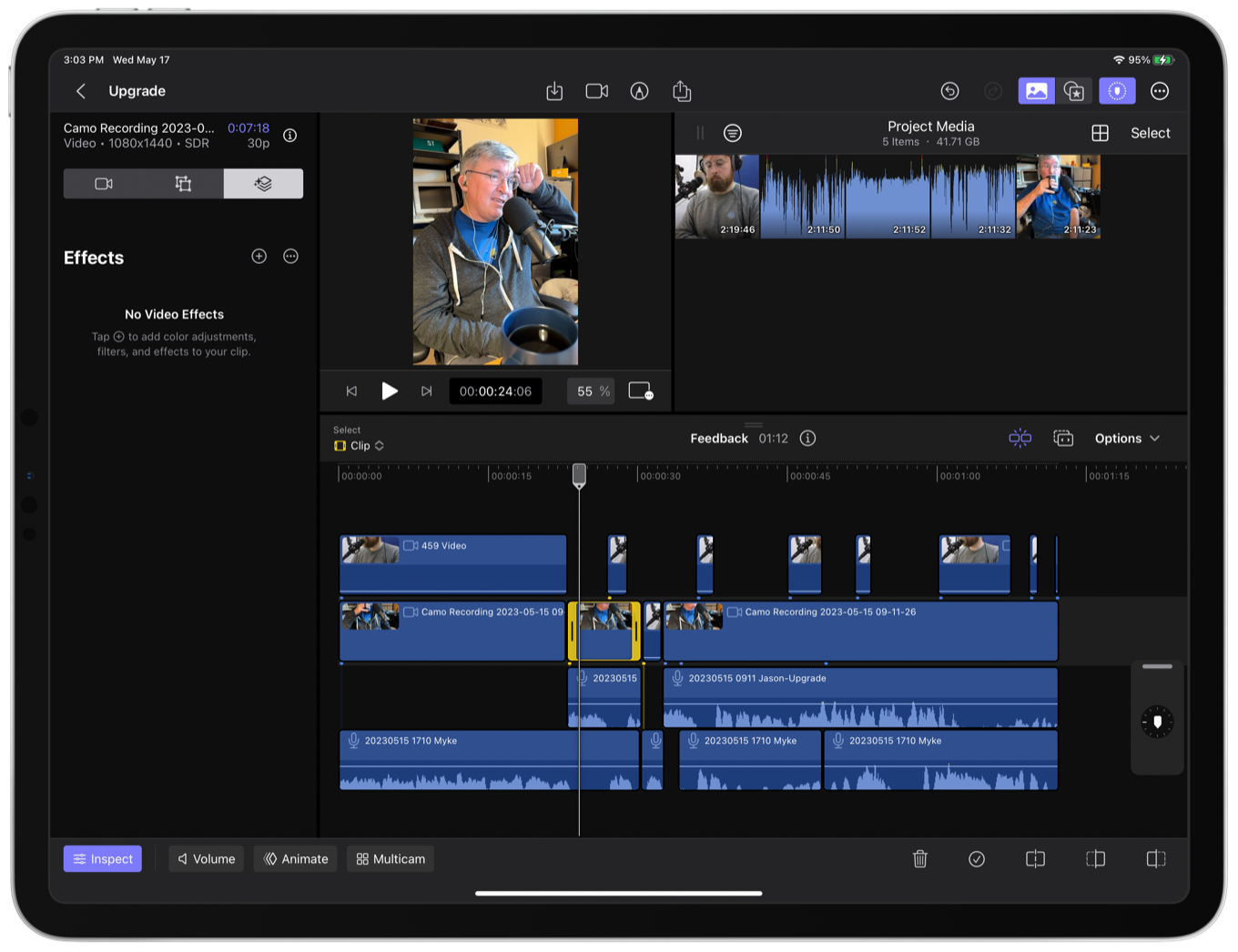
Final Cut Pro is Apple's professional video editor, available only on Mac. It is a one-time purchase of $299.99 (or $4.99/month subscription) and is known for its performance on Apple hardware. Like Premiere Pro, it is a powerful timeline-based editor with a significant learning curve.
Final Cut Pro is faster and more intuitive than Premiere Pro, and its magnetic timeline makes basic editing easier. But it still requires you to manually scrub through footage, split clips, and arrange them. There is no transcript-based editing, no AI filler word removal, no eye contact correction, and no Studio Sound equivalent.
Verdict: Final Cut Pro is a good value for Mac users who want to learn professional editing. But for agents who want fast, easy editing without a learning curve, Descript wins decisively.
Descript vs iMovie
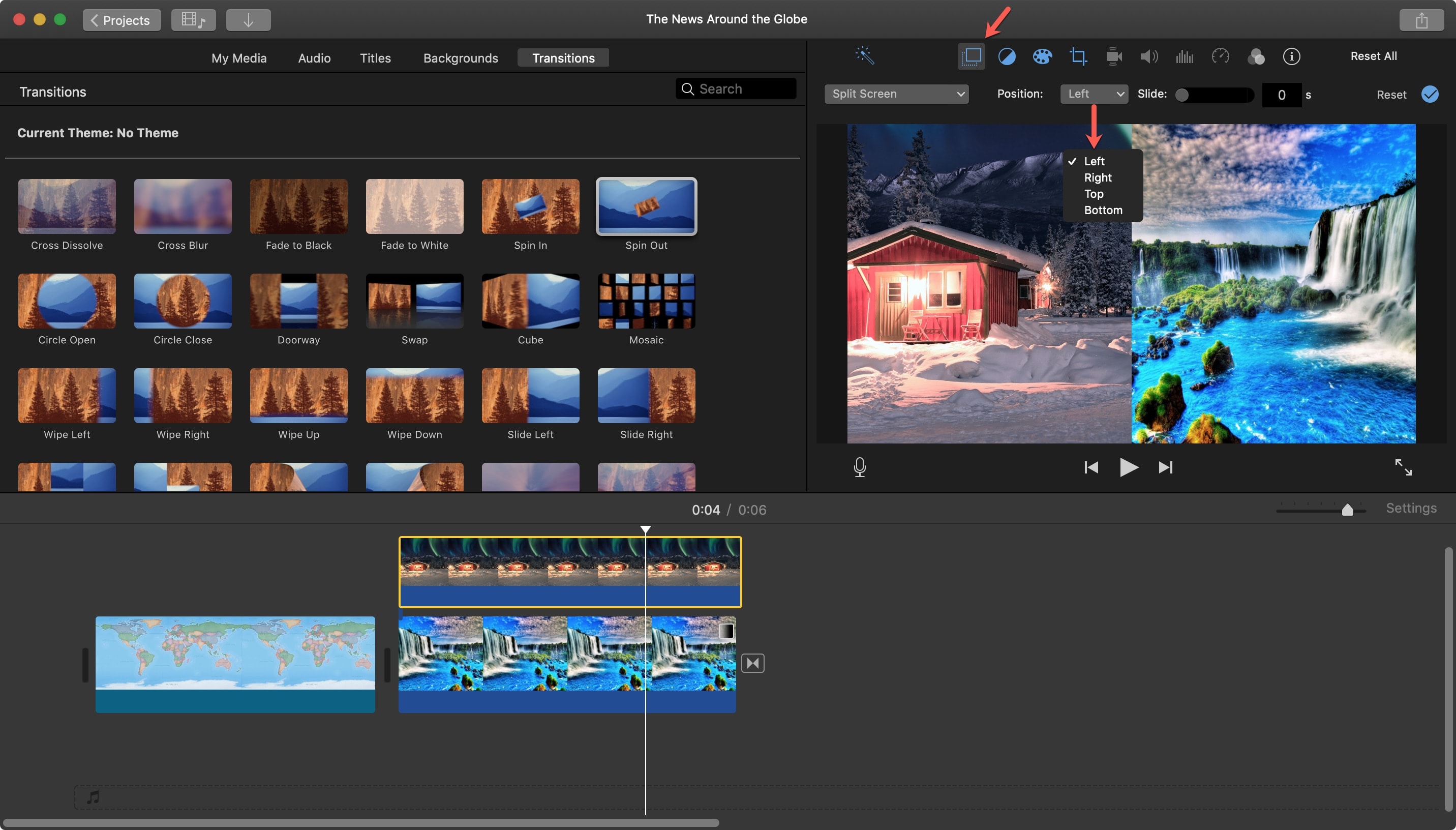
iMovie is Apple's free video editor that comes pre-installed on every Mac and iPhone. It is the simplest traditional editor available and is perfectly fine for basic cuts and trimming.
The problem is that "basic" is all iMovie offers. No AI features, no transcript editing, no noise removal, no auto-captions, no eye contact correction. For a simple trim-and-export workflow, iMovie works. For anything beyond that, you will quickly hit its limitations.
Verdict: iMovie is free and fine for absolute basics. But the AI features in Descript (especially filler word removal and Studio Sound) produce dramatically better results with less effort. The $24/month for Descript is worth it for any agent creating video regularly.

Descript + ListingFlare: The Complete Listing Marketing Workflow
Creating a polished listing video is only half the equation. The video attracts attention and builds interest, but what happens when a buyer wants to learn more? If your video points to Zillow or Realtor.com, that lead goes into a black hole where other agents can snatch them up. If it points to your brokerage's generic website, the buyer might browse for 30 seconds and leave without ever reaching out.
This is where combining Descript with ListingFlare creates a powerful lead generation system. The workflow:
- Record and edit your listing video in Descript. Walk through the property, highlight the best features, and let Descript's AI polish the final product. Add captions for social media. Export both a horizontal version (for YouTube and your website) and a vertical version (for Reels, TikTok, and Stories).
- Create a dedicated property page on ListingFlare. Upload your listing details, photos, and the video itself. ListingFlare generates a beautiful, branded single-property website with an AI chatbot that can answer buyer questions 24/7 - square footage, HOA fees, school districts, commute times, and anything else in the listing data.
- Post your video on social media with a link to your ListingFlare property page. Not a Zillow link. Not a generic brokerage page. A dedicated URL that belongs to you, looks professional, and captures every lead directly into your pipeline.
- The AI chatbot captures leads while you sleep. When a buyer clicks through from your video, they land on a property page that engages them immediately. The chatbot answers their questions, collects their contact information, and notifies you of hot leads in real time. No lead leakage to competing agents.
This workflow turns every listing video into a lead generation machine. The video does the marketing. The ListingFlare page does the conversion. You close the deal.
Think about the numbers. A single Reel with 5,000 views might generate 50 link clicks. Of those 50 visitors, a well-designed property page with an AI chatbot can convert 15% to 25% into leads. That is 7 to 12 qualified buyer leads from one video. Multiply that across all your listings and you are building a serious pipeline with minimal ongoing effort.
Want to see how it works? Try the ListingFlare demo and see the AI chatbot in action on a sample listing.
Our Verdict: Is Descript Worth It for Real Estate Agents?
Yes, with a clear caveat. Descript is worth it if you are committed to creating video content regularly. If you plan to record listing walkthroughs, market updates, neighborhood guides, or social media content at least two to three times per month, Descript will save you hours of editing time and produce significantly better results than you would get from manual editing.
The Hobbyist plan at $24/month is the sweet spot for most agents. It gives you 10 hours of transcription (more than enough for typical usage), plus all the AI features that matter: filler word removal, Studio Sound, eye contact correction, and watermark-free exports. That is less than the cost of one lunch, and it eliminates the biggest barrier to video content creation - the editing process itself.
If you are only creating video once or twice a year for a specific listing, the subscription is harder to justify. In that case, you might be better off paying a freelance editor per project. But for agents who recognize that consistent video content is the future of real estate marketing (and it absolutely is), Descript is the most efficient tool available in 2026.
The transcript-based editing approach is a game-changer for non-technical users. You do not need to learn timelines, keyframes, or audio waveforms. You just read, edit, and export. That simplicity is what makes Descript uniquely valuable for real estate agents who need professional results without professional editing skills.
Our final recommendation: sign up for the free plan, upload one of your existing listing videos, and spend 15 minutes editing it. You will know immediately whether Descript fits your workflow. We are confident most agents will be reaching for their credit card before the 15 minutes are up.
For more tools and strategies to level up your listing marketing, check out our guide to the best AI tools for real estate marketing and our collection of real estate social media post ideas to keep your content calendar full.
Try Descript Free →Frequently Asked Questions
Is Descript free for real estate agents?
Descript offers a free plan with limited transcription, basic editing features, and watermarked exports. It is useful for testing the platform, but for professional real estate content you will want the Hobbyist plan at $24/month (or $16/month annually) or the Business plan at $65/month ($50/month annually) to remove the watermark and access AI features like filler word removal, Studio Sound, and eye contact correction.
Can Descript edit video recorded on a smartphone?
Yes. Descript works with video files from any source, including iPhone, Android, GoPro, DSLR, and screen recordings. Most real estate agents record listing walkthroughs on their smartphones and upload the files directly to Descript. The platform supports all common video formats including MP4, MOV, and AVI.
How accurate is Descript's transcription for real estate terms?
Descript's transcription accuracy is generally 95% or higher for clear English speech. It handles common real estate terms like "primary suite," "open floor plan," "stainless steel appliances," and "hardwood floors" without issues. It occasionally struggles with specific street names, unusual neighborhood names, and heavy accents. You can easily correct any errors by editing the transcript directly.
Does Descript work on Windows and Mac?
Yes, Descript is available as a desktop application for both Windows and macOS. There is no mobile app as of 2026, so you will need a computer to edit your videos. The system requirements are modest - most computers purchased in the last 4 to 5 years will run Descript smoothly.
Can I use Descript to create vertical videos for Instagram Reels and TikTok?
Yes. Descript lets you resize your canvas to 9:16 (vertical), 1:1 (square), 16:9 (horizontal), and other custom aspect ratios. You can take a horizontally recorded listing walkthrough and create a vertical version with repositioned framing, add animated captions, and export it ready for Reels, TikTok, or YouTube Shorts.
Is Descript better than CapCut for real estate videos?
For listing walkthroughs and market updates, yes. Descript's transcript-based editing, filler word removal, Studio Sound, and AI eye contact correction are features CapCut lacks. CapCut is better for quick, trendy social clips with effects and music. Many agents use both - Descript for primary editing and CapCut for short-form effects.
How long does it take to edit a listing video in Descript?
A typical 3 to 5 minute listing walkthrough video takes about 10 to 15 minutes to edit in Descript. That includes uploading, transcription, removing filler words, deleting mistakes, applying Studio Sound, adding captions, and exporting. By comparison, the same edit in a traditional timeline editor would take 45 minutes to an hour for someone with moderate editing skills.
Can I cancel my Descript subscription anytime?
Yes. Descript subscriptions are month-to-month with no long-term contracts. You can cancel anytime from your account settings. If you cancel, you retain access to your plan features until the end of your current billing cycle. Your projects and files remain accessible on the free plan after cancellation, though export options will be limited.